Kubernetes Cluster Architecture

🧭 Introduction
Kubernetes is not just an orchestration tool — it’s a distributed operating system for containers.
A Kubernetes cluster is composed of multiple machines (virtual or physical), connected to form a single, unified compute platform capable of running containerized applications reliably and at scale.
At the highest level, Kubernetes architecture consists of:
- A Control Plane – the “brain” that makes global decisions (scheduling, scaling, healing, etc.).
- A set of Worker Nodes – the “muscle” that runs your workloads (Pods, containers, apps).
This separation ensures flexibility, resilience, and maintainability — allowing the cluster to self-heal, scale automatically, and manage hundreds or thousands of workloads.
🧩 Official cluster diagram (overview)
Below is the official Kubernetes cluster diagram, sourced from the Kubernetes documentation.
 Official diagram showing the control-plane components and worker-node components.
For deeper component diagrams, see the linked sections below — each component section includes an official image or the relevant docs link.
⚙️ The Control Plane — The Brain of Kubernetes
The control plane manages the global state and orchestration logic of the cluster. Every decision — from where to place a Pod to when to restart a failed one — flows through here.
1. API Server (kube-apiserver)
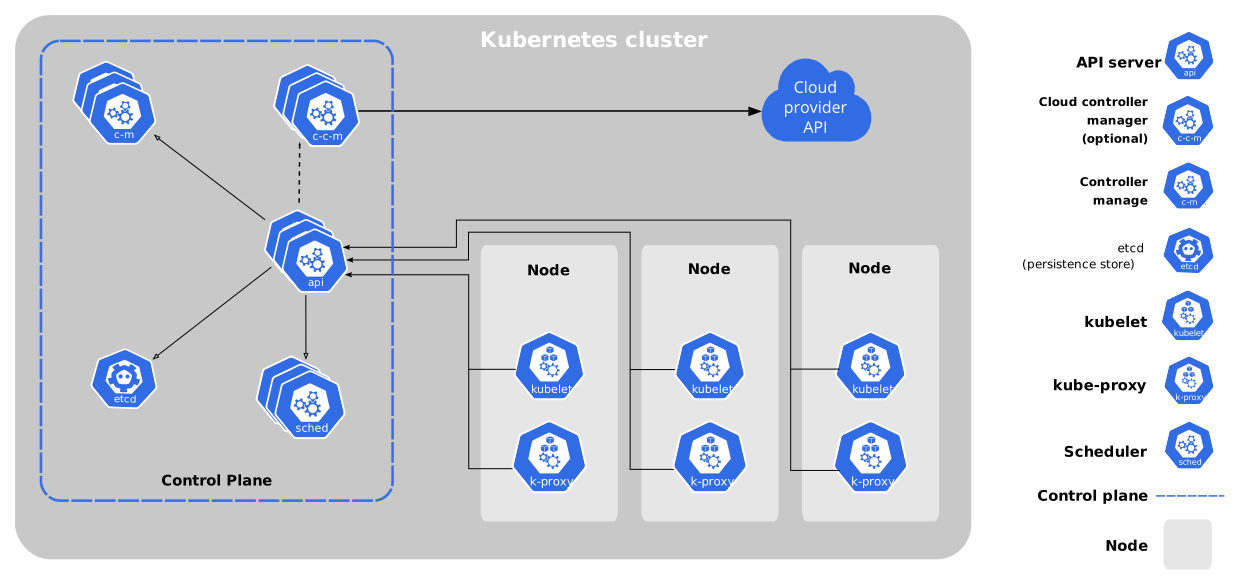 Official diagram: control plane components including kube-apiserver.
The API server is the single entry point into the cluster. Every component (and every human via kubectl) communicates through it.
Responsibilities:
- Exposes the Kubernetes REST API (JSON over HTTP).
- Validates and authenticates all requests.
- Writes all cluster data to etcd.
- Applies admission controllers for policy enforcement and mutation.
Read more: https://kubernetes.io/docs/reference/command-line-tools-reference/kube-apiserver/
2. etcd – The Source of Truth
Official diagram (etcd is part of the control plane). See etcd docs for operational guidance.
etcd is a strongly consistent key-value store used to store all cluster data — nodes, pods, secrets, ConfigMaps, and even the cluster version.
Core Properties:
- Uses the Raft consensus algorithm for reliability.
- Stores all Kubernetes objects in a consistent state.
- Runs as part of the control plane (often on separate machines for HA).
Best Practices:
- Use an odd number of members (3, 5, or 7) to maintain quorum.
- Always perform regular snapshots and store them offsite.
ETCDCTL_API=3 etcdctl snapshot save /var/backups/etcd-snapshot.db --endpoints=https://127.0.0.1:2379 --cacert=/etc/etcd/ca.crt --cert=/etc/etcd/peer.crt --key=/etc/etcd/peer.keyRead more: https://etcd.io/docs/
3. Controller Manager
Official diagram highlights controller manager as part of control plane.
Controllers are the automated workers of Kubernetes. They continuously compare desired state (from manifests) with the current state (from etcd) and take corrective action.
Common controllers include:
- ReplicaSet — ensure correct Pod count.
- Node Controller — monitor node status, mark unresponsive nodes.
- Endpoint Controller — manage Service endpoints.
Read more: https://kubernetes.io/docs/reference/command-line-tools-reference/kube-controller-manager/
4. Scheduler
Official component view (kube-scheduler is shown among control plane components).
The Scheduler decides where to place Pods, considering resources, constraints, and topology.
Read more: https://kubernetes.io/docs/concepts/scheduling-eviction/kube-scheduler/
5. Cloud Controller Manager
The Cloud Controller Manager sits in the control plane and enables cloud-provider-specific control loops (load balancers, routes, node lifecycle).
Read more: https://kubernetes.io/docs/concepts/architecture/cloud-controller/
🖥️ The Worker Nodes — The Data Plane
Worker nodes are where your applications run. Each node hosts the components needed to execute containers, maintain networking, and report back to the control plane.
1. Kubelet
Official diagram includes kubelet in node components.
The kubelet registers the node with API server, watches assigned Pods, manages container lifecycle via CRI, and reports status.
Read more: https://kubernetes.io/docs/reference/command-line-tools-reference/kubelet/
2. kube-proxy
Official docs show kube-proxy as the node-level network agent; many CNIs now implement equivalent dataplane behavior.
kube-proxy manages Service traffic (ClusterIP/NodePort/LoadBalancer) via iptables, IPVS, or userspace proxying. In CNI-native setups, the CNI dataplane may handle service routing.
Read more: https://kubernetes.io/docs/reference/command-line-tools-reference/kube-proxy/
3. Container Runtime (containerd / CRI-O / Docker)
Official diagram references container runtime as part of the node stack.
Kubernetes interacts with container runtimes through the Container Runtime Interface (CRI). Common runtimes: containerd, CRI-O.
Read more: https://kubernetes.io/docs/setup/production-environment/container-runtimes/
🌐 Networking in Kubernetes
Kubernetes networking aims to provide a flat, cluster-wide network — every Pod gets its own IP address and can communicate with any other Pod without NAT.
 Official networking overview from Kubernetes docs.
Networking layers:
- Pod-to-Pod – provided by CNI plugins (Flannel, Calico, Cilium).
- Pod-to-Service – handled via kube-proxy and Services.
- External Access – via Ingress or LoadBalancer Services.
- DNS – CoreDNS provides in-cluster service discovery.
Read more: https://kubernetes.io/docs/concepts/cluster-administration/networking/
🧱 Putting It All Together
Let’s trace a simple example:
- A user runs:
kubectl apply -f deployment.yaml - The API server receives and validates the request.
- The Deployment controller records the desired state in etcd.
- The Scheduler assigns Pods to specific worker nodes.
- The Kubelet on those nodes pulls container images and starts Pods.
- The kube-proxy ensures traffic is load-balanced to these Pods.
- Controllers continuously watch and maintain this desired state.
Result?
Your app runs, self-heals, scales, and stays consistent — without direct operator intervention.
🧩 High Availability Design
To make your cluster production-grade:
| Component | HA Strategy |
|---|---|
| API Server | 2–3 replicas behind a load balancer |
| etcd | 3–5 members, spread across zones |
| Controller Manager / Scheduler | Run multiple instances (leader election handles coordination) |
| Worker Nodes | Use autoscaling groups, self-healing |
| Ingress / DNS | Use external HA load balancers (NGINX, MetalLB, or cloud LBs) |
Always back up etcd and test restoration procedures.
🚨 Common Pitfalls and Misconfigurations
| Issue | Root Cause | Resolution |
|---|---|---|
| etcd latency | Disk I/O bottleneck | Use SSDs, monitor compaction |
| API downtime | Single API server | Add replicas behind LB |
| Pod imbalance | Resource misconfiguration | Define resource requests/limits |
| Network fragmentation | MTU mismatch in overlays | Align MTU with host network |
| Certificate expiration | Manual cert management | Use kubeadm cert renew or automation |
🧠 Design Principles Behind Kubernetes Architecture
- Declarative Management:
Users describe what they want, not how to do it — Kubernetes makes it so. - Reconciliation Loop:
Every component continuously works to make actual state = desired state. - Modularity:
Everything is pluggable — runtimes, CNIs, storage backends, schedulers. - Self-Healing:
Failed containers or nodes automatically get replaced. - Extensibility:
CRDs (Custom Resource Definitions) and Operators extend the control plane seamlessly.
🧭 Reference Architecture (Official)
Official diagram from Kubernetes docs showing all components and interactions.
🧩 References
- Kubernetes Architecture - Official Documentation
- Nodes in Kubernetes
- Control Plane-Node Communication
- Networking Overview
- Cloud Controller Manager
- CNCF Kubernetes Reference Architecture
This post is written to help engineers not only understand how Kubernetes works but also how to design and operate it confidently in production environments.